Home | VBA Section | General Section | Downloads | Licensing | Privacy Policy

Motion Path Tools add-in

The motion path end position tool has been merged into this new motion path tools add-in which will now feature all future additions made to it. This freeware add-in features the following handy tools:

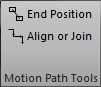
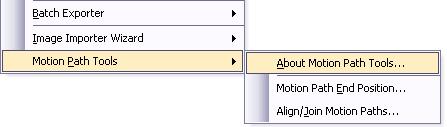
1. Motion Path End Position: It will create duplicate shapes at the position where each of the selected motion path animation ends. Using this tool you can quickly determine the end position of the animation at design time.

2. Align/Join Motion Paths: This tool can align the selected motion path assigned to a shape end to end. It can also consolidate the individual segments of motion to create a single continuous path.


Version Supported

PowerPoint 2002 or later.

Download

Click here (zip)  Freeware

Installation Instructions (applicable only for zip) :

1. Extract the contents of the zip to a folder.
2. Launch PowerPoint.
3. Click on
Tools | Add-ins to bring up the add-ins window.
4. Click on Add to bring up the 'Add New PowerPoint Add-in' dialog box.
5. Navigate to the folder where the contents of the zip file was extracted and select 'mptools.ppa' and click on OK.
6. You might be prompted with the macro virus warning. Enable the macros. When the Add-in is properly loaded, it will display a 'X' against the add-in name.
7. That's it. You have successfully loaded the add-in. Now put it to use.


Note: If you are unable to load the add-in check your macro security setting.


Usage

Usage:
Click on Tools | Motion Path Tools  and select the desired tool.


 View Flash demo


Copyright © 1999-2008 Shyam Pillai. All rights reserved.